

Reactor Timeseries
UI (Human) Applications MIT (Free)
About
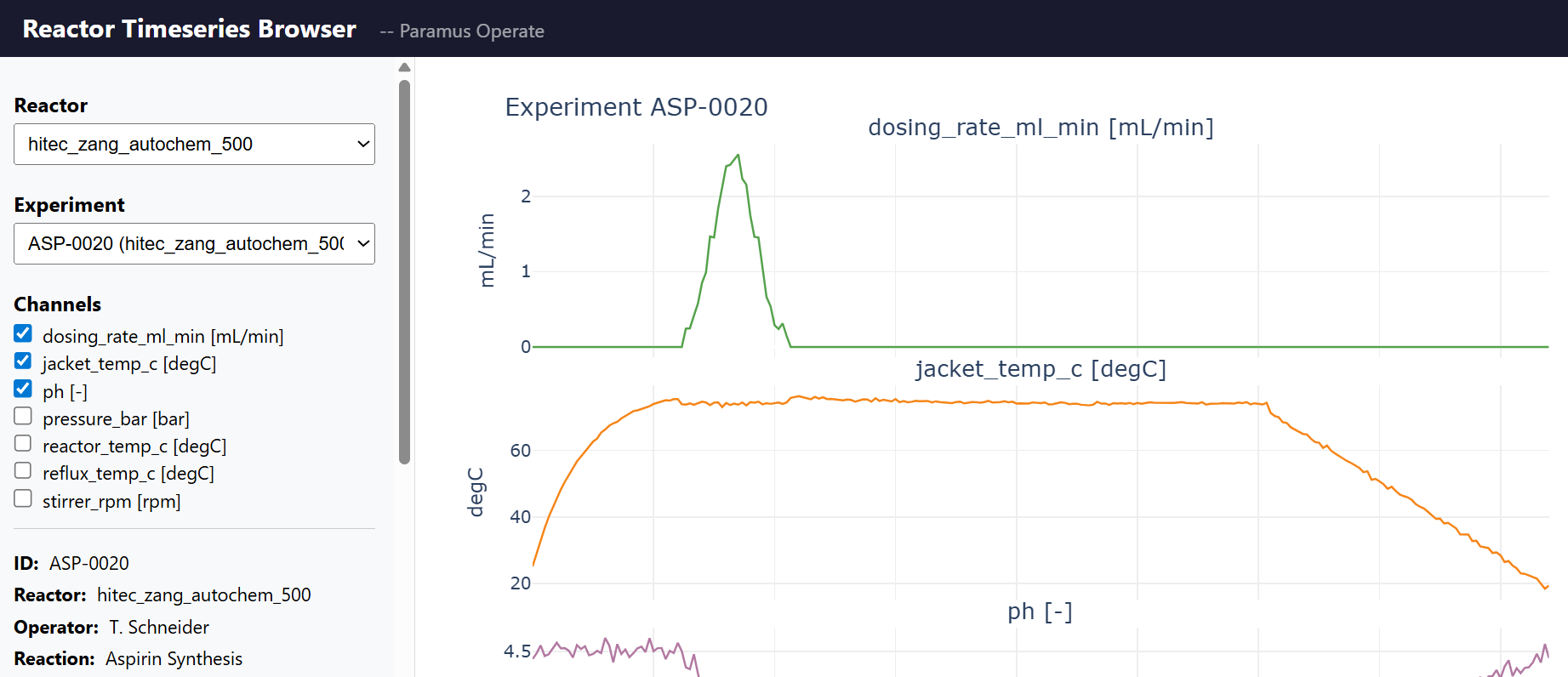
Time series data management for chemical reactor experiments. Supports Systag FlexySys and HiTec Zang reactor systems with 8 measurement channels. Pandas-based data science API for querying, resampling, and comparing reactor runs.
Key Features
- 8 channels: temp, pressure, RPM, pH, heat flow, …
- Pandas API: query, resample, compare, export CSV/Parquet
- SQLite-backed storage with WAL mode
- Yield proxy computation (heat integral, pH, temp stats)
- MCP tools: 9 (list, get, timeseries, channels, stats, compare, yield, health)
Skills
MCP skills available for Reactor Timeseries, callable from AI workflows and the Paramus chat:
- Reactor Ts Changepoints — Detect regime-change points in a reactor channel (ruptures library). Returns breakpoint times and values. Reactor process time series data. Returns a deep_link URL pointing to the matching view in the app UI.
- Reactor Ts Compare — Compare a channel across multiple experiments (time-aligned to elapsed seconds from t0). Reactor process time series data. Returns a deep_link URL pointing to the matching view in the app UI.
- Reactor Ts Find Peaks — Detect peaks (or troughs) in a reactor channel using scipy.signal.find_peaks. Returns peak times, values, prominence, and width. Reactor process time series data. Returns a deep_link URL pointing to the matching view in the app UI.
- Reactor Ts Get Channels — List available measurement channels for an experiment. Reactor process time series data. Returns a deep_link URL pointing to the matching view in the app UI.
- Reactor Ts Get Experiment — Get metadata for a single experiment by ID. Reactor process time series data. Returns a deep_link URL pointing to the matching view in the app UI.
- Reactor Ts Get Statistics — Get descriptive statistics (min, max, mean, std, median, count, percentiles) for a channel. Reactor process time series data. Returns a deep_link URL pointing to the matching view in the app UI.
- Reactor Ts Get Timeseries — Get time series data (wide format) for an experiment. Returns timestamps and channel values. Returns a deep_link URL pointing to the matching view in the app UI.
- Reactor Ts Health — Health check for the reactor timeseries service. Returns status, version, and experiment count. Reactor process time series data. Returns a deep_link URL pointing to the matching view in the app UI.
- Reactor Ts Integral — Compute the integral (area under the curve) of a channel using the trapezoidal rule. Useful for energy, dose, and cumulative metrics. Reactor process time series data. Returns a deep_link URL pointing to the matching view in the app UI.
- Reactor Ts List Experiments — List reactor experiments. Optional filter by reactor_id or reaction_name. Reactor process time series data. Returns a deep_link URL pointing to the matching view in the app UI.
- Reactor Ts List Reactors — List registered reactor hardware with specs (volume, temperature range, max RPM, pressure max). Reactor process time series data. Returns a deep_link URL pointing to the matching view in the app UI.
- Reactor Ts Slope — Compute linear slope (regression) for a channel over the entire experiment or a time window. Returns slope per second/minute/hour, R², p-value. Reactor process time series data. Returns a deep_link URL pointing to the matching view in the app UI.
- Reactor Ts Spectrum — Compute the Welch power spectral density of a reactor channel. Returns frequency axis (Hz) and power, plus dominant frequency. Reactor process time series data. Returns a deep_link URL pointing to the matching view in the app UI.
- Reactor Ts Yield Proxy — Compute yield proxy metrics: heat integral, pH endpoints, temperature stats. Reactor process time series data. Returns a deep_link URL pointing to the matching view in the app UI.
Browse the full Reactor Timeseries skill documentation
Frequently Asked Questions
What is Reactor Timeseries?
Reactor Timeseries is a ui (human) applications application available in the Paramus App Store. Time series data management for chemical reactor experiments. Supports Systag FlexySys and HiTec Zang reactor systems with 8 measurement channels. Pandas-based data science API for querying, resampling, and comparing reactor runs.
Is Reactor Timeseries free to use?
Yes. Reactor Timeseries is distributed under the MIT (Free) license and is available at no cost through the Paramus App Store.
How do I install Reactor Timeseries?
Reactor Timeseries is installed through Paramus Chemistry OS, an on-premise Windows platform for computational chemistry. Open the Paramus App Store in your local installation and select Reactor Timeseries for one-click deployment.
What are the key features of Reactor Timeseries?
Key features of Reactor Timeseries include: 8 channels: temp, pressure, RPM, pH, heat flow, …; Pandas API: query, resample, compare, export CSV/Parquet; SQLite-backed storage with WAL mode; Yield proxy computation (heat integral, pH, temp stats).
What type of application is Reactor Timeseries?
Reactor Timeseries belongs to the “UI (Human) Applications” category in the Paramus App Store. It runs on Paramus Chemistry OS and can also be accessed through Paramus Cloud for supported workflows.
What platform does Reactor Timeseries run on?
Reactor Timeseries runs on Paramus Chemistry OS, a Windows-based on-premise platform that provides local compute power for demanding simulations. It requires a Paramus OS installation with appropriate hardware resources.
Can Reactor Timeseries be automated or integrated with AI workflows?
Yes. Reactor Timeseries is available as part of the Paramus ecosystem which supports MCP (Model Context Protocol) tools for AI-driven automation. This enables integration with large language models and automated research pipelines.