
Paramus Developers Portal
User and provider documentation. Admin features are documented separately.
1. Public catalogue
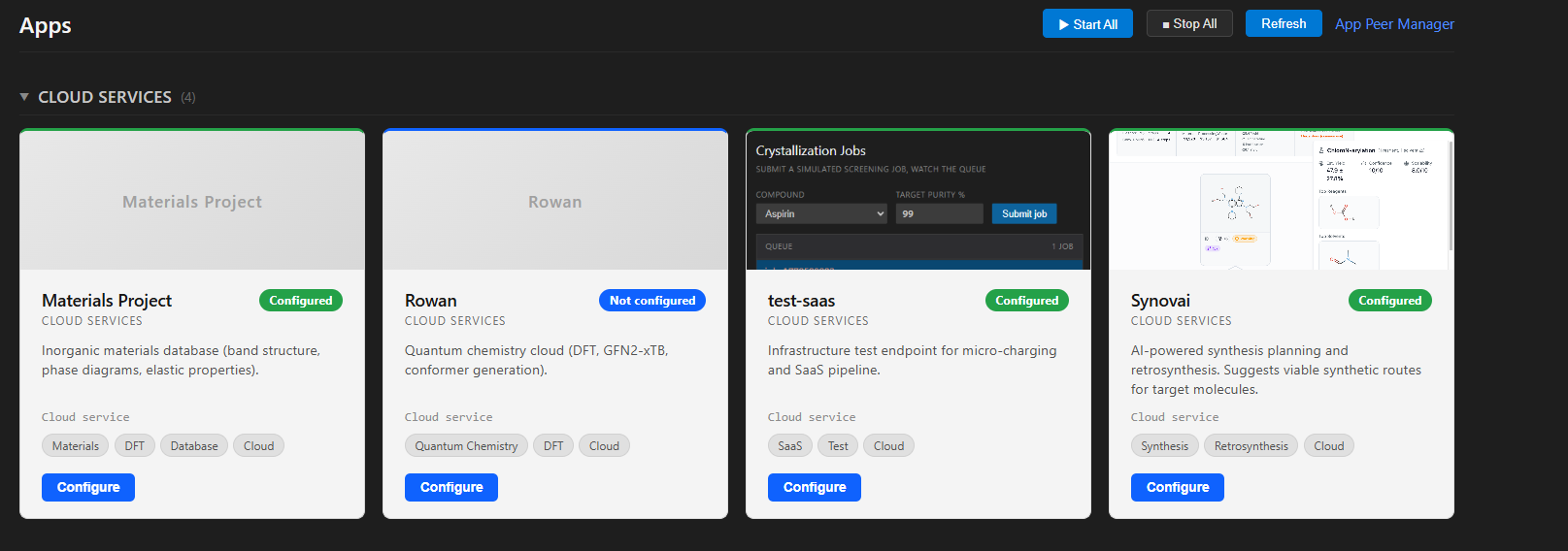
Approved apps are part of the Paramus Chemistry System. They appear in the desktop client as cloud-service cards and can be used seamlessly, with no installation effort, including from inside LLM workflows (VS Code, Claude, Windsurf, …). Card data is taken directly from the My App submission once approved.
Paramus also supports micropayment: per-call charging is handled by the Paramus cloud balance, so end users can pay for individual API calls without setting up a separate account with each provider. Providers receive a payout via the method configured on their card.
User configuration
End users click Configure on a card to set authentication and billing for that app:
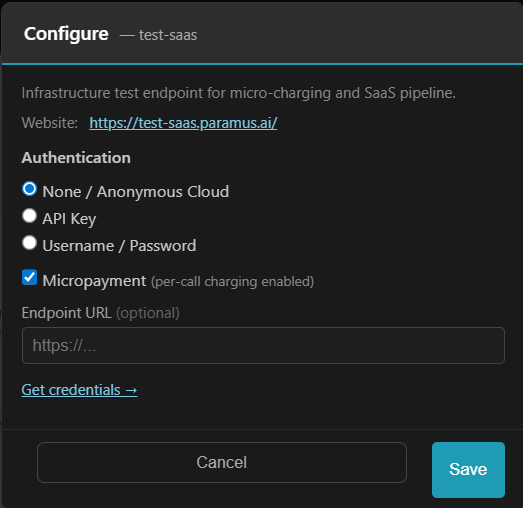
- None / Anonymous Cloud: call the app without credentials (only
if the provider allows it).
- API Key: paste the key issued by the provider; sent as
X-API-Key on every call.
- Username / Password: basic auth, exchanged for a session token
by the provider.
- Micropayment: enable per-call charging through the Paramus
cloud balance. Disable to use the provider’s own billing.
- Endpoint URL (optional): override the default base URL, for
example to target a staging environment.
- Get credentials: opens the provider’s website where the user
signs up and retrieves keys.
Settings are stored locally on the user’s machine.
2. Access
Sign in (customers only, after registration) and open the Developer page in the left sidebar. The status field shows your role (USER or ADMIN). Click Go to developers to enter the portal with single sign-on.
Role mapping:
USER-> portal roleuser(can use a mapped app).ADMIN-> portal roleadmin(cannot own apps).
If you do not see the Developer page, you are not yet enrolled in the developer program. Submit the request form on the account page.
3. My App
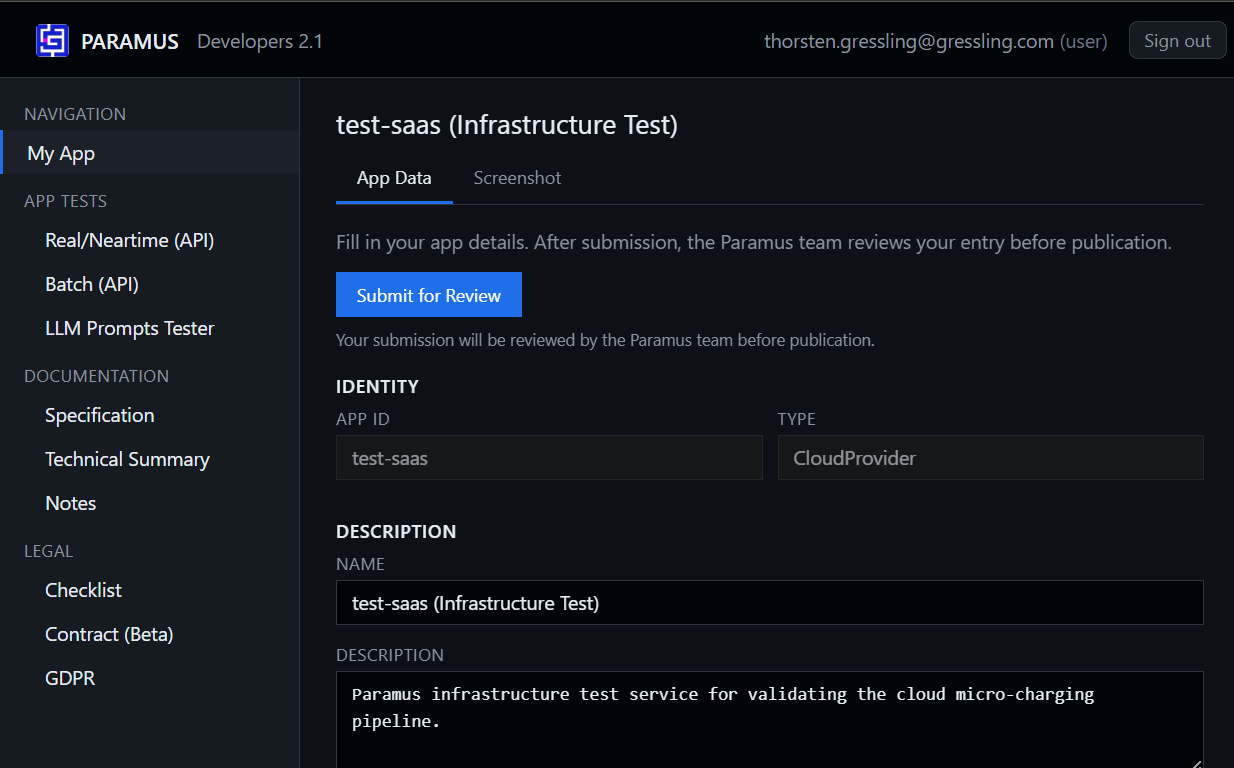
The My App page is where a provider edits the public card of an app (identity, description, URL, keywords, screenshot) and submits it for review. The same page is visible to users that have been mapped to one or more apps.
Tabs:
- App Data: identity, description, URL, keywords, payout method,
tool list.
- Screenshot: PNG/JPG/WebP up to 5 MB. Shown on the public catalogue
card.
Submitting saves the card and flags it for review by the Paramus team. No data is published before review.
Multiple apps
If more than one app is mapped to your account, the sidebar shows an Active App combobox above Navigation. Switching it reloads My App and all App Tests against the selected app.
No app mapped
If your account has no app yet, My App shows a Request app or app mapping button with an optional note. The request is emailed to support@paramus.ai.
4. App Tests
Tools that exercise your live backend with your own API key. Paramus never stores or forwards the key.
4.1 Real / Neartime (API)
Interactive Swagger / OpenAPI 3 tester for synchronous endpoints — the kind that return a result in one HTTP round trip (real-time) or within a few seconds (near-time). Use it to verify that your live backend behaves exactly as the spec promises before submitting for review, and to debug regressions afterwards.
Load a spec and call any endpoint of your app directly from the browser. Endpoints tagged with x-paramus-tools are highlighted because Paramus exposes them as MCP tools to LLMs.
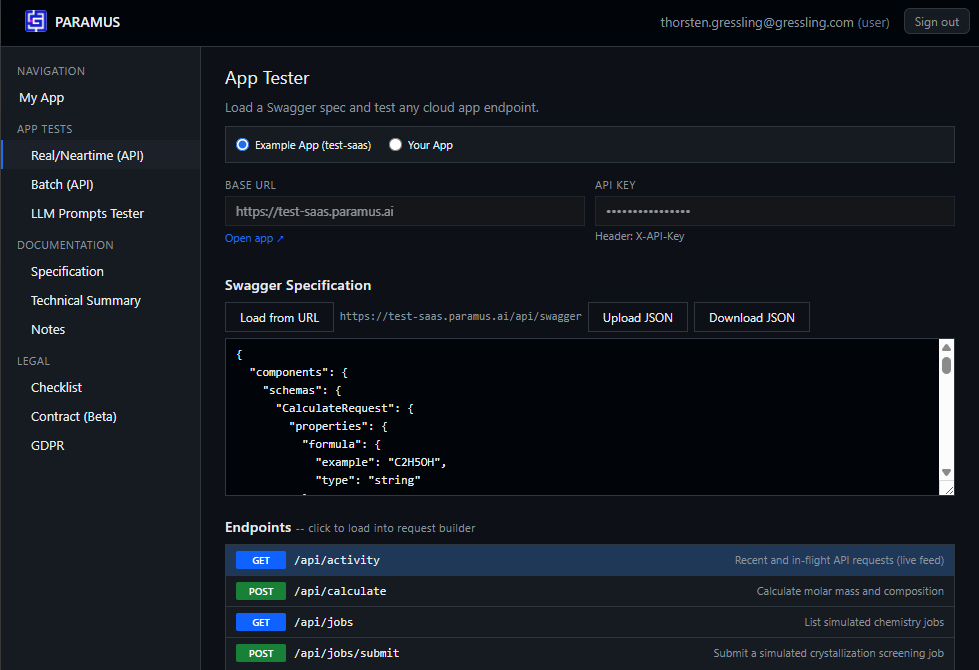
Workflow:
- Choose Example App (
test-saas) or Your App. - Set the base URL and the
X-API-Keyheader. - Load the swagger from URL or upload a JSON file.
- Click an endpoint to load it into the request builder, fill the body
and send. Response and timing are shown inline.
4.2 Batch (API)
Same idea as Real/Neartime but for async / job-based endpoints (submit -> poll -> result). The tester submits a job, polls the queue and displays progress and the final payload.
4.3 Deep-Links (upcoming)
Authenticated, time-limited URLs that open a partner app on a specific tool, job, dataset or result. The user lands already signed in, on the right object. The tester will let you mint and verify deep-links once released.
4.4 LLM Prompts Tester
Verifies the MCP interface of Paramus against your app. Multi-turn conversation with tool-call tracing, cost estimation and a yes/no confirmation gate before any chargeable call.
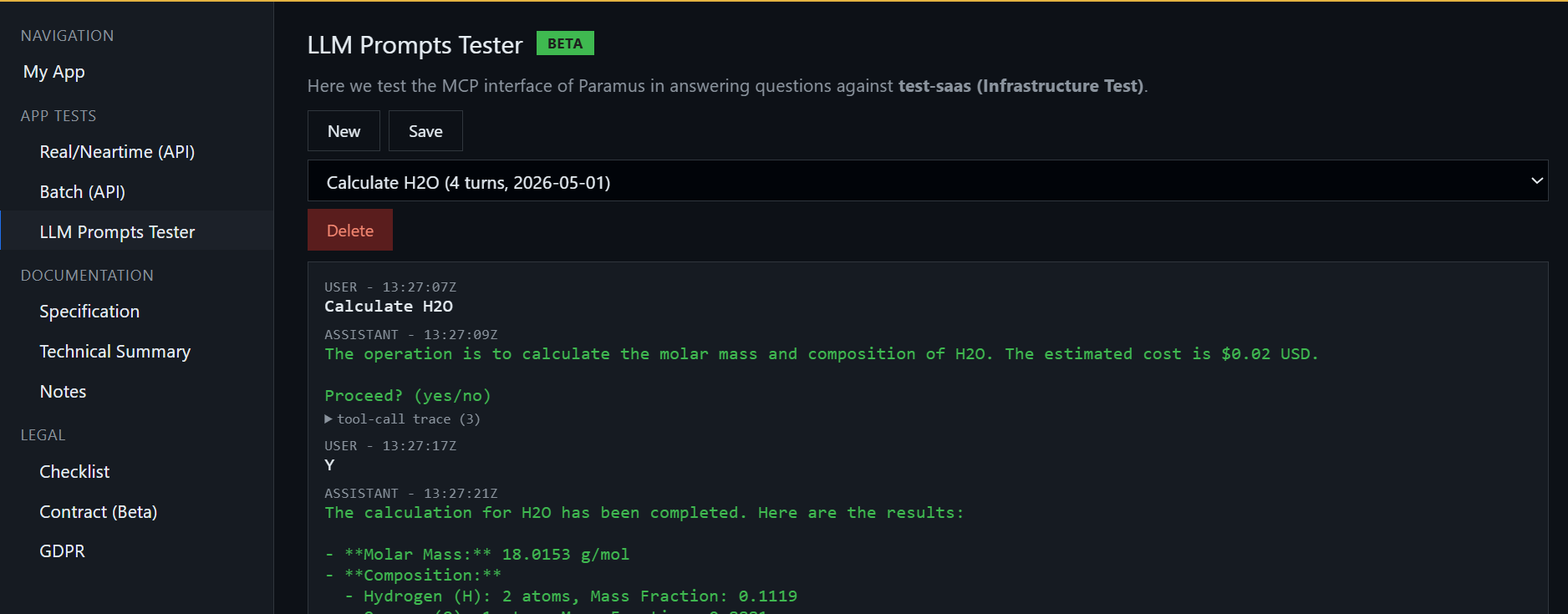
Sessions are saved per account; New, Save and Delete manage them.
5. Documentation
Static reference pages embedded in the portal.
- Specification: full app-card and endpoint spec a provider must
implement.
- Technical Summary: short architecture overview.
- Notes: personal scratch space, saved per account.
6. Legal
6.1 Checklist
Ten-item readiness checklist that a provider should complete before submitting for review. Saved automatically.
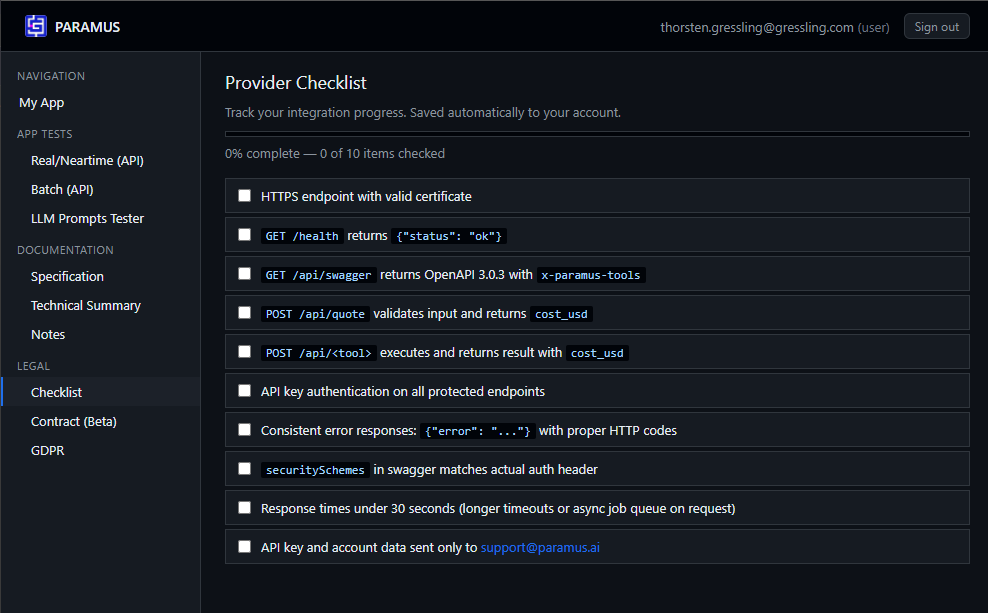
Covers HTTPS, /health, /api/swagger with x-paramus-tools, /api/quote, /api/, API-key auth, error format, securitySchemes consistency, response time and the support contact address.
6.2 Contract (Beta)
Beta provider agreement. Read, accept, and download a signed PDF copy.
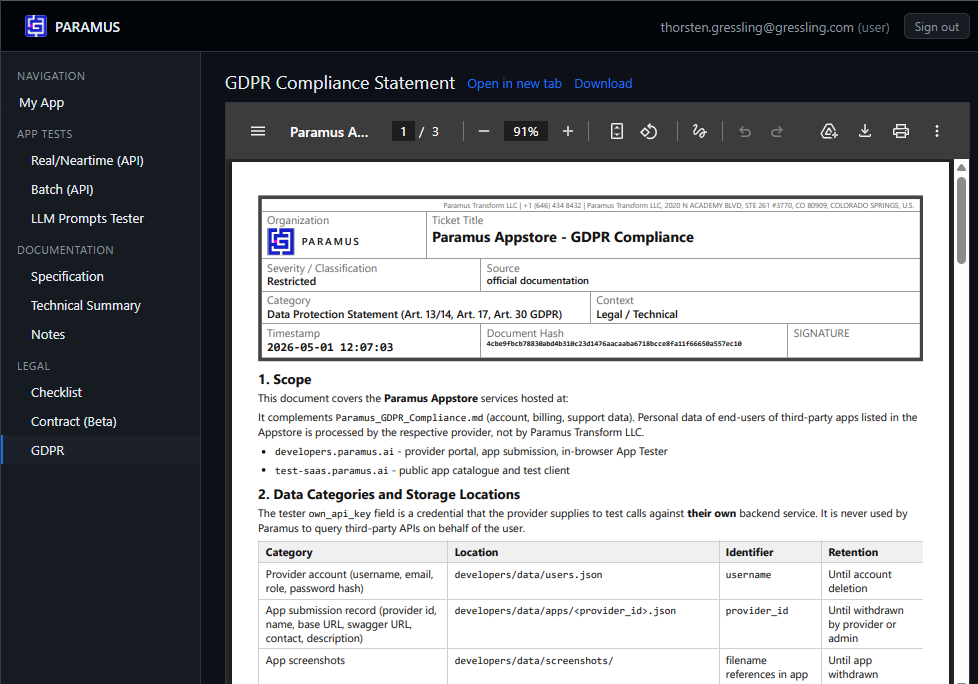
6.3 GDPR
Data-protection statement for the Appstore: which data Paramus stores, where, and for how long. Distinct from the account-level GDPR notice.
Frequently Asked Questions
A web portal at `paramus.ai` where providers submit cloud apps to the Paramus Chemistry OS, test them against real and batch APIs, run LLM (MCP) prompt tests, complete the legal checklist, and where users configure apps already mapped to their account.
Sign in to `account`, open the Developer page and request access. Approved accounts can click Go to developers and are signed in via single sign-on.
Each API call can be charged in fractions of a cent against the user’s Paramus cloud balance. The provider receives a payout via the method configured on the app card. Users can disable micropayment in the Configure dialog and use the provider’s own billing instead.
Approved apps are exposed as MCP tools. Any endpoint tagged with `x-paramus-tools` in the provider’s OpenAPI spec becomes callable by an LLM. The LLM Prompts Tester page lets a provider verify this end-to-end before publication.
A signed, time-limited URL that opens a partner app on a specific tool, job, dataset or result with the user already authenticated. Support for minting and verifying deep-links is upcoming.
On the end user’s local machine, inside the Paramus desktop client. Paramus never stores or forwards provider API keys to third parties.
Yes. If your account is mapped to more than one app, an Active App combobox appears above Navigation. Switching it reloads My App and all App Tests against the selected app.
The My App page shows a Request app or app mapping button. The request is emailed to `support@paramus.ai` and a Paramus admin assigns an existing app or creates a new empty one for you.
HTTPS endpoint, `/health`, `/api/swagger` with `x-paramus-tools`, `/api/quote`, `/api/