

External Apps: Why Your Tools Belong in the Conversation
A Paramus installation is never the whole story. Your group already runs a database someone wrote years ago, a viewer a student built, an MCP server a vendor just published. The question is not whether those exist – it is whether your AI agent can reach them without a six-week integration project. That is what external apps are for.
Three ways in, one folder
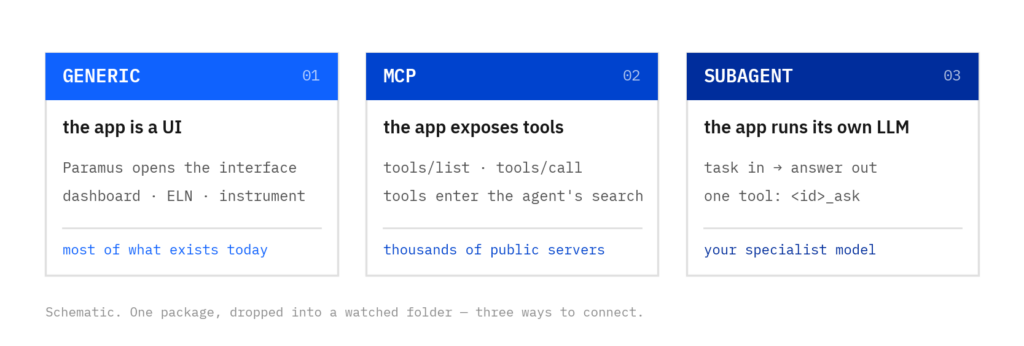
An external app is a package you drop into a folder. Paramus picks it up, checks it, and registers it at runtime – no commit, no release cycle, no restart. Three kinds cover the space:
- Generic – the app is a UI Paramus opens: your dashboard, your ELN, your instrument viewer. Simple, and it is most of what exists today.
- MCP – the app exposes tools over the Model Context Protocol (
tools/list,tools/call). Any of the thousands of public MCP servers becomes a first-class Paramus app in a minute; its tools show up in the agent’s search like any other. - Subagent – the app is a chat API (OpenAI-compatible, or an A2A agent card) with its own LLM behind it. Paramus delegates a task and gets an answer back – one tool,
<id>_ask. Your specialist model, your colleague’s instance, a vendor’s assistant.
Why it matters
Because chemistry does not stand still and neither does your tooling. A published MCP server for a database you use, a sub-agent that knows your SOPs, a vendor’s packaged app – they should be usable the day you hear about them, not after the next release. External apps turn “we should integrate that” into “drop it in and try it”.
Trust is the design, not an afterthought
Dropped-in code is unverified by default. Every tool call carries provenance (where did this come from); the first run of anything that executes code asks once; a remote MCP or sub-agent can only reach the one host named in its manifest unless you widen it; and a drop-in never appears as a Paramus-verified tool. When an app proves itself, integrating it means what it means today – it becomes a committed, documented, catalogued Paramus app.
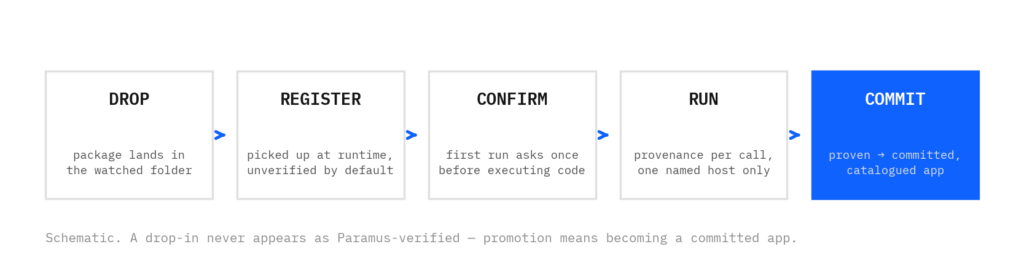
Customer-specific internal applications mount the same way: the runtime watches a folder, so your own app is live the moment its package is there. See the catalog: documentation.paramus.ai/apps/.
Fact sheet: External App Package 1.0 (PDF, one page) – what you ship, what Paramus does, what stays yours and what Paramus enforces, with the whole manifest of a hello-world app.
FAQ
A package you drop into a folder. Paramus picks it up, checks it and registers it at runtime – no commit, no release cycle, no restart.
Three: generic apps (a UI Paramus opens, such as a dashboard or ELN), MCP apps (tools exposed over the Model Context Protocol) and subagents (a chat API with its own LLM, reached through one tool).
No. Dropped-in code is unverified by default: every tool call carries provenance, the first run of anything that executes code asks once, a remote app reaches only the host named in its manifest, and a drop-in never appears as a Paramus-verified tool.
Yes. Customer-specific internal applications mount the same way: the runtime watches a folder, so the app is live as soon as its package is there.