NAMD
Nanoscale Molecular Dynamics
Computing Applications (HPC) UIUC-NAMD (Partial)
About
A parallel molecular dynamics engine for simulating large biomolecular systems, supporting CHARMM, AMBER, and OPLS force fields with free energy perturbation, replica exchange, and QM/MM capabilities.
Key Features
- Force fields: CHARMM, AMBER, OPLS
- Methods: FEP, replica exchange, QM/MM
- Scalability: MPI, GPU acceleration
- Integration: VMD visualization
Skills
MCP skills available for NAMD, callable from AI workflows and the Paramus chat:
- Capabilities — Get NAMD capabilities and supported features including force fields, GPU support, and simulation types.
- Changelog — Get NAMD module version history and changes.
- Colvars — Run NAMD collective variables / enhanced sampling (Layer 3).
- Dynamics — Run NAMD molecular dynamics (Layer 3).
- Fep — Run NAMD Free Energy Perturbation (Layer 3).
- Info — Get NAMD module information and capabilities.
- Kernel Execute — Execute command in NAMD shell session.
- Kernel List — List active NAMD shell sessions.
- Kernel Start — Start interactive shell session in NAMD Docker container.
- Kernel Stop — Stop NAMD shell session.
- Methods — Get list of available NAMD RPC methods.
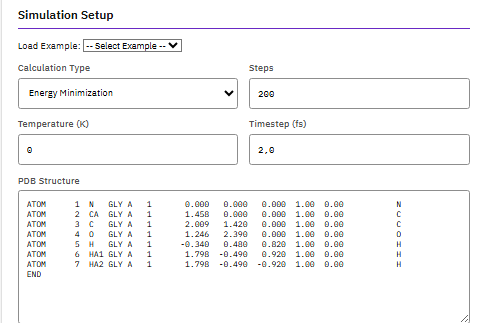
- Minimize — Perform energy minimization for large biomolecular systems. Uses conjugate gradient minimization optimized for proteins, nucleic acids, and membrane systems with scalable parallel execution.
- Version — Get NAMD program version from Docker container.
Browse the full NAMD skill documentation
Free for academic use. Commercial license required from UIUC.
Citation
Phillips, J.C. et al. Scalable molecular dynamics on CPU and GPU architectures with NAMD. J. Chem. Phys. 153, 044130 (2020). DOI:10.1063/5.0014475
Frequently Asked Questions
What is NAMD?
NAMD is a computing applications (hpc) application available in the Paramus App Store. A parallel molecular dynamics engine for simulating large biomolecular systems, supporting CHARMM, AMBER, and OPLS force fields with free energy perturbation, replica exchange, and QM/MM capabilities.
What license does NAMD require?
NAMD is distributed under the UIUC-NAMD (Partial) license. Commercial use may require a separate license. License compliance is verified during Paramus OS registration.
How do I install NAMD?
NAMD is installed through Paramus Chemistry OS, an on-premise Windows platform for computational chemistry. Open the Paramus App Store in your local installation and select NAMD for one-click deployment.
What are the key features of NAMD?
Key features of NAMD include: Force fields: CHARMM, AMBER, OPLS; Methods: FEP, replica exchange, QM/MM; Scalability: MPI, GPU acceleration; Integration: VMD visualization.
What type of application is NAMD?
NAMD belongs to the “Computing Applications (HPC)” category in the Paramus App Store. It runs on Paramus Chemistry OS and can also be accessed through Paramus Cloud for supported workflows.
What platform does NAMD run on?
NAMD runs on Paramus Chemistry OS, a Windows-based on-premise platform that provides local compute power for demanding simulations. It requires a Paramus OS installation with appropriate hardware resources.
Can NAMD be automated or integrated with AI workflows?
Yes. NAMD is available as part of the Paramus ecosystem which supports MCP (Model Context Protocol) tools for AI-driven automation. This enables integration with large language models and automated research pipelines.
How should I cite NAMD in publications?
The recommended citation for NAMD is: Phillips, J.C. et al. Scalable molecular dynamics on CPU and GPU architectures with NAMD. J. Chem. Phys. 153, 044130 (2020). DOI:10.1063/5.0014475